Core Concepts
This section covers the fundamental concepts of WebF. Understanding these will help you use the framework effectively.
What is a WebF App?
A WebF app consists of two complementary parts that work together to create powerful hybrid applications:
1. Web Standards Layer
Standard HTML, CSS, and JavaScript code that’s compatible with web standards:
- Framework Support: Works with popular frameworks like React, Vue, and vanilla JS
- Familiar APIs: Uses standard DOM APIs, CSS styling, and JavaScript features
- Portability: Code can run in browsers with minimal modifications
- Ecosystem Access: Leverage the vast npm ecosystem and web development tools
2. Flutter Integration Layer
Custom APIs, components, and services exposed from Flutter:
- Custom Elements: Flutter widgets accessible as HTML elements (e.g.,
<flutter-button>) - Native Modules: Dart/Flutter APIs callable from JavaScript (e.g., camera, storage, sensors)
- Platform Features: Direct access to device capabilities through Flutter plugins
- Native Performance: Critical UI components rendered by Flutter’s high-performance engine
The Hybrid Architecture
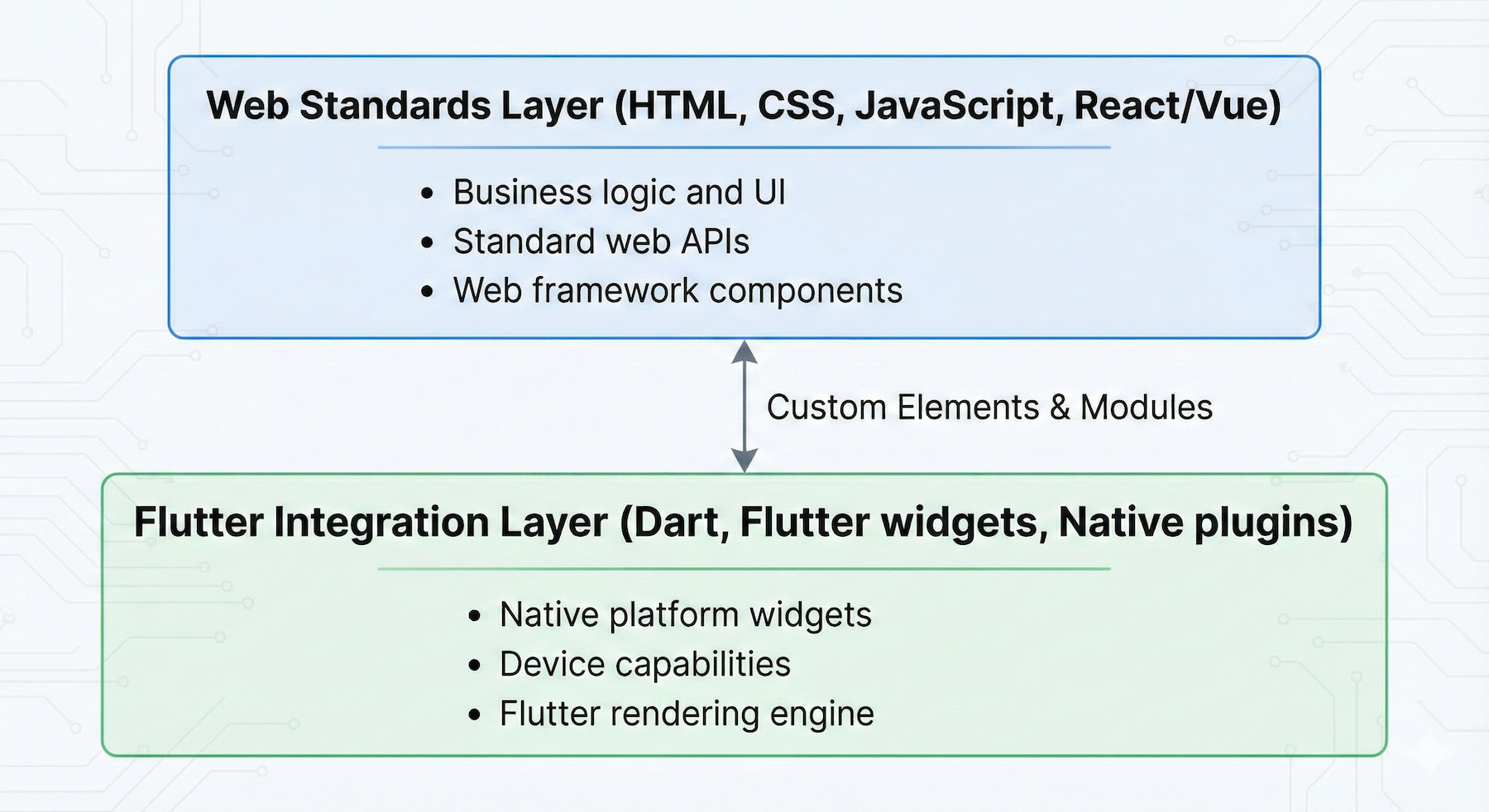
This dual-layer architecture enables you to:
Example Integration:
// React code using both web standards and Flutter widgets
import React, { useState } from 'react';
import { FlutterCupertinoButton } from '@openwebf/react-cupertino-ui';
import { FlutterGestureDetector } from '@openwebf/react-core-ui';
import { WebFShare } from '@openwebf/webf-share';

function ShareableContent() {
  const [likes, setLikes] = useState(0);

  // Call native share module
  const handleShare = async () => {
    await WebFShare.shareText({
      text: 'Check out this amazing content!',
      url: 'https://example.com'
    });
  };

  // Handle double-tap gesture with Flutter's gesture detector
  const handleDoubleTap = () => {
    setLikes(likes + 1);
  };

  return (
    <div className="content">
      {/* Standard HTML/CSS */}
      <h2>My Content</h2>
      <p>This is a hybrid WebF app combining web and Flutter!</p>

      {/* Flutter gesture detector for advanced gestures */}
      <FlutterGestureDetector onDoubleTap={handleDoubleTap}>
        <div className="like-area">
          <span>❤️ {likes} likes</span>
          <p>Double-tap to like</p>
        </div>
      </FlutterGestureDetector>

      {/* Flutter widget (Cupertino button) */}
      <FlutterCupertinoButton onClick={handleShare}>
        Share Content
      </FlutterCupertinoButton>
    </div>
  );
}
Key Characteristics
- Not a browser: WebF builds Flutter apps, not WebF apps running in browsers
- Native rendering: Uses Flutter’s rendering engine, not browser rendering
- JavaScript runtime: Powered by QuickJS for efficient JS execution
- Web standards support: Implements core DOM/CSS APIs with C++ and Dart
- Native UI: Mix Flutter widgets and WebF app content seamlessly
- Over-the-air updates: Update your web layer without app store approval (within platform guidelines)
Benefits
- Best of Both Worlds: Combine web development speed with native performance
- Code Reuse: Share code between web and mobile platforms
- Team Flexibility: Web and Flutter developers can work together
- Rapid Iteration: Update UI and logic quickly using web technologies
- Native Integration: Access platform features through Flutter
For detailed information on creating custom Flutter widgets and modules for your WebF apps, see:
- Native UI Guide - Creating Flutter widgets as custom elements
- Build Native Plugins - Exposing Flutter APIs to JavaScript
DOM & Elements
The foundation of your application’s UI in WebF is the Document Object Model (DOM), just like on the web. While you can use standard DOM APIs directly, you will typically use a UI framework like React, Vue, or Svelte to provide a more declarative way to build your UI.
A simple React component in WebF looks exactly like it would for the web:
function HelloWorld() {
  const styles = {
    backgroundColor: 'yellow',
    padding: '10px'
  };
  return <div style={styles}>Hello, from WebF!</div>;
}

// This component would be rendered using ReactDOM.
Async Rendering
A key difference between WebF and a browser is WebF’s asynchronous rendering model. In a browser, DOM changes can immediately trigger a synchronous and blocking layout and paint. WebF avoids this for better performance.
-
DOM updates are cheap: When you call
appendChild()or change a style, WebF does not immediately re-render the screen. It waits for the next rendering frame. -
Batched Updates: This model allows WebF to batch multiple DOM changes together and process them in a single, optimized pass, avoiding layout thrashing.
-
Onscreen and Offscreen Events: To work with the asynchronous renderer, WebF provides two essential, non-standard events:
onscreenandoffscreen. Because DOM elements can exist in the tree before they are laid out, you must use these events to know when it is safe to access layout-dependent APIs likeelement.getBoundingClientRect()orwindow.getComputedStyle().- The
onscreenevent fires when an element has been fully laid out and rendered. - The
offscreenevent fires when an element is no longer rendered.
Attempting to measure an element or get its computed style before the
onscreenevent has fired will result in incorrect or zero-based values. - The
Note for React Developers
The @openwebf/react-core-ui package provides a useFlutterAttached hook to handle this. The hook accepts optional onAttached and onDetached callbacks and returns a ref object to pass to your element. The onAttached callback is the correct place to perform measurements.
import { useFlutterAttached } from '@openwebf/react-core-ui';

function MyComponent() {
  const flutterRef = useFlutterAttached(
    () => {
      console.log('Component is now rendered by Flutter.');
      // It's now safe to perform measurements on the element.
      if (flutterRef.current) {
        const rect = flutterRef.current.getBoundingClientRect();
        console.log('Element position:', rect.top, rect.left);
      }
    },
    () => {
      console.log('Component is detached from the Flutter render tree.');
    }
  );

  return <div ref={flutterRef}>Content</div>;
}
CSS & Styling
WebF supports styling your application using Cascading Style Sheets (CSS), following W3C standards. You can use most of the CSS features you already know to control layout, colors, fonts, and more.
- Layout: WebF supports modern CSS layout techniques. This includes:
- Standard flow layout (block, inline, and inline-block), with full support for Right-to-Left (RTL) text.
- Positioned layout (using
position: absolute,relative,fixed,sticky). - Flexbox, which is the recommended approach for building most UIs.
- CSS Grid is available as experimental (most features landed).
- Unsupported: Please note that legacy layout models like
floatandtablelayouts are not supported.
- Selectors: You can target elements using a wide range of CSS selectors.
- Applying Styles: Styles can be applied using
<style>tags, external stylesheets, or inline styles.
For information on integrating popular styling tools like Tailwind CSS or pre-processors like Sass/SCSS, please see the Advanced Styling section.
JavaScript & Events
WebF provides a modern JavaScript environment and supports the standard W3C event model, including the capturing and bubbling phases of event propagation.
Default Interactive Event
For performance reasons, only the click event is enabled on all elements by default. In React, you can use the onClick prop as you normally would.
function ClickableButton() {
  const handleClick = () => {
    console.log('Button was clicked!');
  };
  return <button onClick={handleClick}>Click Me</button>;
}
Advanced Gestures
To enable more complex gestures like double-tap or long-press, you must use a special component. In React, this is the <FlutterGestureDetector> component from the @openwebf/react-core-ui package.
import { FlutterGestureDetector } from '@openwebf/react-core-ui';

function MyInteractiveComponent() {
  const handleDoubleTap = () => {
    console.log('Component was double-tapped!');
  };

  return (
    <FlutterGestureDetector onDoubleTap={handleDoubleTap}>
      <div style={{ padding: '20px', border: '1px solid #ccc' }}>
        Double-tap me!
      </div>
    </FlutterGestureDetector>
  );
}
Networking and Data
WebF provides standard web APIs for networking and data storage.
Networking
The standard fetch API is fully supported for HTTP requests:
// Fetch data
const response = await fetch('https://api.example.com/data');
const data = await response.json();

// POST request
await fetch(url, {
  method: 'POST',
  headers: { 'Content-Type': 'application/json' },
  body: JSON.stringify(data)
});
Popular networking libraries like Axios, React Query, and SWR work out of the box. WebSockets are also fully supported.
Local Storage
Store data locally using Web Storage APIs:
// Persistent storage
localStorage.setItem('key', 'value');
const value = localStorage.getItem('key');

// Session-only storage
sessionStorage.setItem('temp', 'data');Note: IndexedDB is not supported. For complex local databases, use native plugins with SQLite or Hive.
Learn more: See the complete Networking and Data Guide for detailed examples, error handling, React Query integration, and storage best practices.
Hybrid Routing
Hybrid Routing in WebF is fundamentally different from traditional Single-Page Applications (SPAs). To achieve a truly native navigation experience with proper screen transitions, WebF does not use the standard History API or hash-based routing.
Instead, WebF uses a hybrid routing mechanism, where each “page” of your WebF application is rendered on a separate, native Flutter screen. This approach provides:
- Native transitions: Platform-native screen animations
- Proper lifecycle: Each route has its own lifecycle
- Hardware back button: Correct behavior on Android
- Memory management: Unused routes can be unloaded
For React developers, use the @openwebf/react-router package which provides a familiar component-based API:
import { Route, Routes, WebFRouter } from '@openwebf/react-router';

function App() {
  return (
    <Routes>
      <Route path="/" element={<HomePage />} title="Home" />
      <Route path="/profile" element={<ProfilePage />} title="Profile" />
    </Routes>
  );
}

// Programmatic navigation
WebFRouter.pushState({ userId: 123 }, '/profile');
Learn more: See the complete Hybrid Routing Guide for detailed examples, advanced navigation methods, and cross-platform patterns.
Accessing Native Features
WebF allows your application to go beyond the limits of a standard browser by accessing native device capabilities like the camera, system share dialog, or local file system. This is made possible by an internal mechanism called the Native Binding System.
As a web developer, you will not use this system directly. Instead, you will consume this functionality through WebF Native Plugins—pre-packaged npm modules that expose specific native features to your JavaScript code.
For example, after installing the @openwebf/webf-share package, you can use its WebFShare class inside a React component to trigger the native share dialog:
import React from 'react';
import { WebFShare } from '@openwebf/webf-share';

function ShareButton() {
  const handleShare = async () => {
    if (WebFShare.isAvailable()) {
      await WebFShare.shareText({
        url: 'https://openwebf.com',
        text: 'Check out this powerful new way to build apps!',
        title: 'WebF'
      });
    } else {
      console.log('Share API is not available in this environment.');
    }
  };

  return <button onClick={handleShare}>Share This App</button>;
}
The @openwebf/webf-share package also provides a useWebFShare hook for more advanced use cases.
To learn how to find and integrate these plugins, please see the Native Plugins section.
State Management
Because WebF is compatible with the modern web ecosystem, you can handle state management using the same tools and patterns you already use for web development.
Framework Built-ins
Use your framework’s built-in state management:
- React:
useState,useReducer, and Context API - Vue: Reactivity system with
ref,reactive, and Composition API - Svelte: Built-in reactive statements and stores
State Libraries
Any major state management library from npm works with WebF:
- Redux, Zustand (React)
- Pinia (Vue)
- XState (state machines)
- MobX, Jotai, Recoil
Quick example with Zustand:
import { create } from 'zustand';

export const useStore = create((set) => ({
  count: 0,
  increase: () => set((state) => ({ count: state.count + 1 })),
}));

// In component
function Counter() {
  const { count, increase } = useStore();
  return <button onClick={increase}>Count: {count}</button>;
}
Learn more: See the complete State Management Guide for detailed examples, best practices, and advanced patterns.
Web API Compatibility
While WebF aims for W3C compliance, it is an application runtime, not a browser. As such, its support for various Web APIs differs. Below is a summary of the compatibility status for common APIs.
| API | Supported | Notes |
|---|---|---|
| Essential APIs | ||
Timers | ✅ Yes | setTimeout, setInterval, and requestAnimationFrame are supported. |
URL API | ✅ Yes | URL and URLSearchParams are fully supported. |
| Storage | ||
localStorage | ✅ Yes | Fully supported for persistent key-value storage. |
sessionStorage | ✅ Yes | Fully supported for session-only key-value storage. |
IndexedDB | ❌ No | For complex local data, use a native plugin. |
| Networking | ||
fetch | ✅ Yes | Fully supported. |
XMLHttpRequest | ✅ Yes | Supported for legacy use cases. |
WebSockets | ✅ Yes | Fully supported for real-time communication. |
| Graphics & Animation | ||
CSS Animations & Transitions | ✅ Yes | Fully supported. |
SVG | ✅ Yes | Rendering of <svg> elements is supported. |
Canvas (2D) | ✅ Yes | The 2D canvas context is supported. |
WebGL | ❌ No | |
Web Animations API | ❌ No | The JavaScript API for controlling animations is not yet supported. |
| Workers | ||
Web Workers | ❌ No | JavaScript runs on a dedicated thread, so Web Workers are not needed. |
| DOM & UI | ||
Shadow DOM | ❌ No | Not used for component encapsulation. |
Custom Elements | ✅ Yes | Fundamental to the native UI model. |
MutationObserver | ✅ Yes | Supported for observing DOM changes. |
Intersection Observer | ✅ Yes | The onscreen and offscreen events provide equivalent functionality. |